C

What is C?
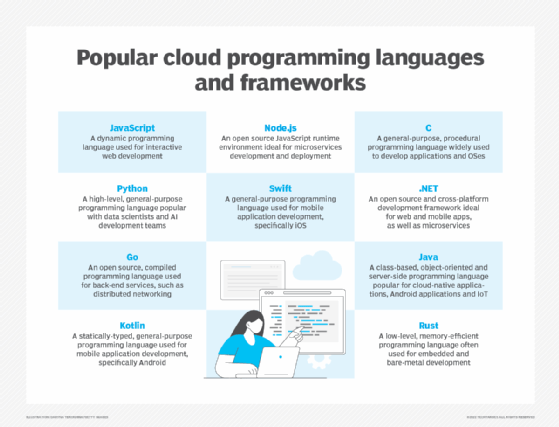
The C programming language is a procedural and general-purpose language that provides low-level access to system memory. A program written in C must be run through a C compiler to convert it into an executable that a computer can run. Many versions of Unix-based operating systems (OSes) are written in C and it has been standardized as part of the Portable Operating System Interface (POSIX).
Today, the C programming language runs on many different hardware platforms and OSes such as Microsoft and Linux.
Pros and cons of C
The C language comes with a set of special characteristics, making it one of the most widely used languages of all time. The following are the main benefits of using C:
- Structured. It offers a structured programming approach for breaking down problems into smaller modules or functions that are easy to understand and modify.
- Portable. C is machine-independent and C programs can be executed on different machines.
- Mid-level programming language. It's a mid-level language that supports the features of both a low-level and a high-level language.
- Rich library. It offers numerous built-in library functions that expedite the development process.
- Dynamic memory allocation. C supports the dynamic memory allocation feature, which can be used to free the allocated memory at any time by calling the free() function.
- Speed. It's a compiler-based language, which makes the compilation and execution of code faster. Since only essential and required features are included in C, it saves processing power and improves speed.
- Pointers. C uses pointers, which improve performance by enabling direct interaction with the system memory.
- Recursion. C enables developers to backtrack by providing code reusability for every function.
- Extensible. A C program can be easily extended. If code is already written, new features and functionalities can be added to it with minor alterations.
C also comes with a few shortfalls, even though it's an ideal language for programming beginners due to its simple syntax, algorithms and modular structure. The following are a few disadvantages of using C:
- OOP features. C doesn't extend its support for object-oriented programming (OOP) features, which enables the creation of subclasses from parent classes. Unlike Java, Python or C++, multiple inheritances can't be created in C, which makes it difficult to reuse existing code.
- Namespace feature. C lacks namespace features, which means the same variable name can't be reused in one scope. Without namespaces, it's impossible to declare two variables with the same name.
- Run-time checking. C doesn't display code errors after each line of code; instead, all the errors are presented by the compiler after the program has been written. This can make code checking a challenge, especially for larger programs.
- Exception handling. C lacks exception handling, which is the ability to handle exceptions, such as bugs and anomalies that can happen during source code
- Constructor and destructor. Since C isn't object oriented, it doesn't offer constructor and destructor features. Constructing or destructing a variable in C must be done manually through a function or by other means.
- Garbage collection. C isn't equipped with garbage collection. This important feature automatically reclaims memory from objects that are no longer required by the library or an app.
Where is C used?
C has a wide range of real-world applications that aren't limited to the development of OSes and applications. C is also used in areas such as graphical user interface development and integrated development environments.
The following are some use cases for the C language:
- OSes, such as Unix and all Unix applications;
- databases, including Oracle Database, MySQL, Microsoft SQL Server and PostgreSQL, which are partially written in C;
- language compilers, including the C compiler;
- text editors;
- print spoolers;
- assemblers;
- network drivers;
- modern programs, such as Git and FreeBSD;
- language interpreters; and
- utilities, such as network drivers, mouse drivers and keyboard drivers.
What's the difference between C and C++?
While C and C++ sound familiar, the usage and features of both languages differ to a certain extent. C++ is a superset and successor to the C language that uses an entirely different set of programming concepts. C is a procedural programming language, whereas C++ provides OOP support.
The following highlights the differences between the two languages:
- C is a procedural language that provides no support for objects and classes. C++ is a combination of OOP and procedural programming languages.
- C has 32 keywords and C++ has 63 keywords.
- C supports built-in data types, while C++ supports both built-in and user-defined data types.
- C doesn't have access modifiers, whereas C++ does.
- C uses the <stdio.h> header file for input and output operations and C++ uses the <iostream.h> header file for input and output operations.
- C can't hide data, while C++ is secure and provides encryption.
- There's no direct exception handling support in C, but C++ supports it.
- C doesn't support function and operator overloading, but C++ does.
- In C, the main() function calls are made through other functions used in the code, but C++ doesn't provide that functionality.
- Reference variables aren't supported by C, but C++ supports them.
History of C
The C programming language was developed at the former AT&T Bell Laboratories in the early 1970s by computer scientist Dennis Ritchie. The successor to the B language, C was initially developed for writing code for the Unix operating system, which at the time used assembly programs that communicated directly with the computer hardware. Assembly programs can be complex and lengthy, and programmers needed a language that promoted a user-friendly set of instructions. C fulfilled these objectives and also helped overcome the challenges that programmers experienced with BASIC, B and Basic Combined Programming Language.
Due to its popularity and flexible features, it was soon released for cross-platform usage and quickly became commercialized. C is still commonly used in web development projects and many popular languages, such as Java, PHP and JavaScript have directly or indirectly borrowed features and syntax from C.
While C has transformed over the years, it's still used commonly in lower-level programs, such as kernels.
C has rapidly evolved since its inception. Examine the history of C, how it has evolved and why it's still relevant today.